
The development of LCD (Liquid Crystal Display) screens has gone through multiple stages, including the upgrade of backlighting from CCFL to LED strips, the transformation of the body from thick and heavy to slim and light, the expansion of color gamut from standard to wide gamut, and further advancement to quantum dot technology, as well as the shift from non dimmable to local dimming. These continuous improvements aim to provide a better visual experience.
For users with high color requirements, such as designers, the color gamut parameter of a monitor is crucial. Therefore, when choosing a monitor, the color gamut parameter is a very important consideration.
This article will systematically introduce the definition and standards of monitor color gamut, explore various mainstream methods to achieve wide color gamut through backlight technology, and outlook the future prospects of high color gamut display technology.
Part 1: Definition of Color Gamut
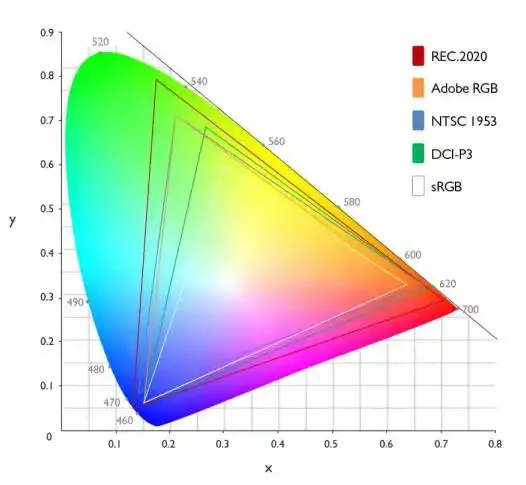
Color gamut, also known as color space, refers to the range of colors that can be displayed or reproduced. “Color” refers to the hues, and “gamut” refers to the scope, encompassing all visible light. In two‑dimensional space, there are two representation methods:
1) Using the x, y coordinate system (CIE 1931 non‑uniform color space);
2) Using the u’, v’ coordinate system (CIE 1976 uniform color space). On the chromaticity diagram, the area marked with colors represents the visible light color region, which is horseshoe‑shaped.
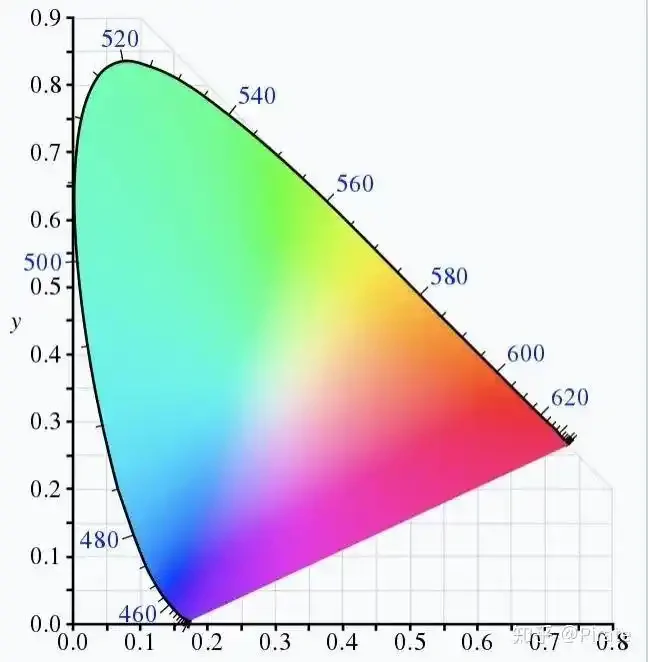
So, what is a chromaticity diagram? We all know that red, green, and blue are the three primary colors. Any color perceived by us is a combination of spectra from these three different colors.
In 1931, the International Commission on Illumination (CIE) proposed the CIE‑XYZ chromaticity diagram, which has since become the universally adopted color standard in the industry.
The CIEXYZ chromaticity diagram shows the range of all colors perceptible to the human eye. The horizontal and vertical axes represent stimulus values. The color gamut is formed by a straight line and a curve, with wavelengths (in nm) marked along the curve.
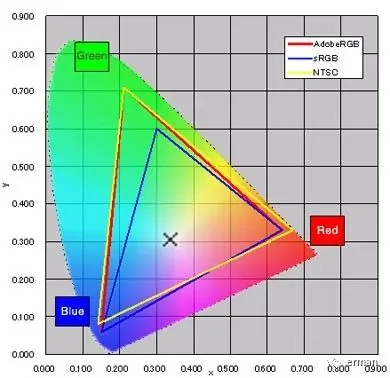
CIE‑1931 Chromaticity Diagram
In the diagram above, the area enclosed by the dotted line, shaped like an inverted “U”, represents the range of colors visible to the naked human eye. The triangles formed by the other three colored lines represent the color ranges reproducible by various standards.
In fact, even the most advanced display technologies cannot fully reproduce all the colors of CIE‑1931. Therefore, based on applications in fields like photography, videography, and printing, various industries have established corresponding color standards. They select specific areas within the CIE‑1931 chromaticity diagram as benchmarks, defining multiple color gamut standards.
Part 2: Four Common Color Gamut Standards
Currently, the most common color gamut standards for computer monitor screens are generally four: sRGB, NTSC, Adobe RGB, and DCI‑P3. Their main difference lies in the breadth of the color range they cover.
· NTSC Gamut: Formulated in 1953 by the National Television System Committee in the United States, its purpose was to establish a color standard for the then‑emerging CRT color televisions. The NTSC television standard they introduced was a broadcast television transmission protocol used in systems in countries like the USA and Japan. This means the NTSC color space is more commonly used in the television industry.
· sRGB Gamut: Developed jointly by Microsoft and Hewlett‑Packard in 1996. Due to the vast user base of Windows, almost all mainstream devices from PCs and Macs to cameras, scanners, printers, and projectors support sRGB. The vast majority of content on the internet, including text, images, and videos, also adheres to the sRGB color gamut.
· Adobe RGB: Introduced in 1998 by the professional software producer Adobe. Its first planwas to encompass both sRGB (commonly used for computers) and CMYK (commonly used for printing). This allows digital photos to be displayed and edited normally on computers and also printed without color loss or distortion. Adobe RGB covers a wider color range than sRGB and is favored by designers, making it widely used in professional photography and post‑production fields.
· DCI‑P3: A color gamut applied in digital cinema, often marketed as the “cinema gamut.” It is a standard focused on human visual experience, striving to match the full color gamut show in movie scenes, with a broader range of reds and greens. It is commonly adopted in Apple products. Therefore, if you use a Mac, choosing a monitor with high DCI‑P3 color coverage is recommended for optimal effect.
· Rec. 2020: A wide color gamut standard applicable to HDTV and future 4K/8K UHDTV.
Part 3: How to Choose a Screen Based on Color Gamut?
· Adobe RGB: For users in photo retouching, color grading, video editing, printing/publishing, or those with high color accuracy requirements, paying attention to monitors with good Adobe RGB coverage is advised.
· sRGB Gamut: This standard is defined for computer peripheral devices. For general office work and web browsing, an sRGB‑gamut device is sufficient.
· NTSC Gamut: As a television standard and the widest of the three mentioned, professionals in broadcasting and film/TV can primaril refer its values. In the LCD industry, specifications often reference the NTSC gamut standard.
· DCI‑P3 Gamut: Suitable for professionals in film and video production.
Part 4: Factors Affecting Color Gamut Size
Two direct factors affect color gamut size: the Color Filter (CF) used on the LCD glass and the backlight design.
The final color is formed by the mixture of light transmitted through the R/G/B filters of the CF. Different LCD panels use different CFs, which requires using LED white light with different chromaticity coordinates to adjust the white point of the LCD display.
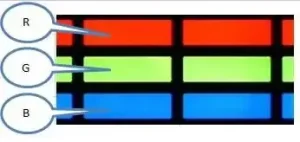
Backlight design requires that the spectral peaks of the RGB components constituting the LED white light are close to the peak transmission wavelengths of the RGB CF filters. Meanwhile, the narrower the (full width at half maximum, FWHM) of the RGB spectra, the better, to reduce crosstalk between colors and achieve higher color gamut values.
Part 5: Common Methods to Improve Color Gamut
Once the LCD panel is confirmed, the CF is also fixed. Therefore, the key factor in imporve the color gamut of an LCD display is the backlight. In backlight design, there are two main methods to improve color gamut:

The LCD itself does not emit light to display images. To see an image, an electrical signal must be applied to the liquid crystals, and a backlight is needed. Within the structure of the LCD glass, the component affecting color gamut is the Color Filter (CF), composed of red, green, and blue filter elements. Only light sources with spectra near to the CF’s passbands can effectively transmit through.
1. Using High‑Gamut LEDs to Improve Color Gamut
Standard white LEDs are composed of a blue chip + YAG phosphor, achieving about 72% NTSC gamut. There are multiple ways to make high‑gamut LEDs. The following chart compares various schemes.
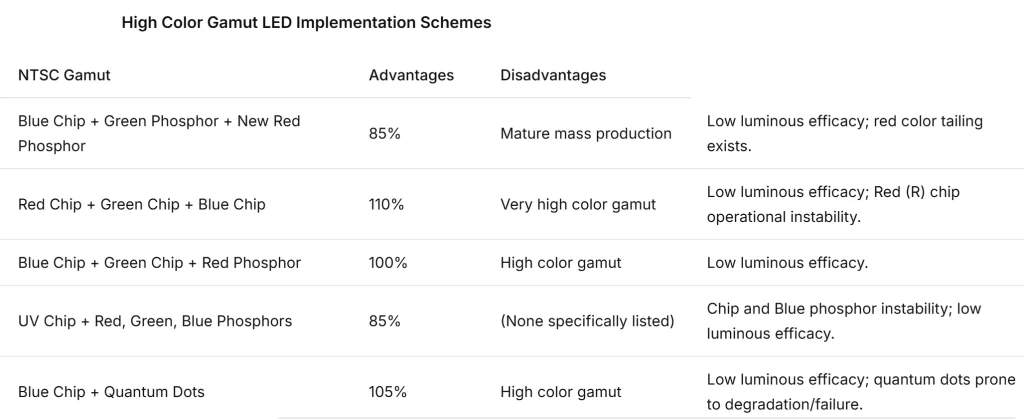
The Blue Chip + Green Phosphor + New Red Phosphor (e.g., KSF) scheme is common. The key to achieving high gamut lies in selecting phosphors with matching peak wavelengths, narrow FWHM, etc., relative to the CF spectra.
Let’s focus on the new red phosphor KSF. KSF, along with KGF and KTF, are fluoride phosphors. KSF has a cubic crystal structure. This new red phosphor (KSF) is potassium fluorosilicate activated by tetravalent manganese and is widely used in high‑gamut LEDs. KSF phosphor ishygroscopicity and prone to oxidation.
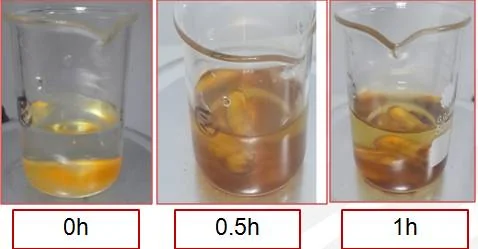
Under high temperature conditions, it can undergo a reversible chemical reaction with water, changing color from orange to brown. Its brightness damping significantly at high temperatures but can recover after cooling. Due to these characteristics, its storage conditions are very strict to avoid damage from temperature and humidity. During application, materials with good airtightness and heat dissipation must be used, requiring careful selection of LED packages and encapsulants.
2. Using Quantum Dots to Improve Color Gamut
Quantum dots are semiconductor nanocrystals composed mainly of zinc, cadmium, selenium, and sulfur atoms. Quantum confinement of electrons and holes gives them discrete energy levels. When stimulated by light or electricity, quantum dots emit colored light. Different compositions or sizes of quantum dots cause them to emit light in different wavelength regions. By adjusting size or composition, quantum dots can emit light with high spectral purity and symmetry.
Main characteristics of quantum dots:
· Nanocrystals with size between 1‑10 nm.
· Contact with water/oxygen causes chemical reactions leading to failure.
· Emit specific frequency light under electrical or optical excitation; inorganics shine materials are more stable and efficient than organic ones.
· Emit pure, single color, light with Ultra‑narrow half‑wave width (≤35 nm).
· Practically, by changing quantum dot size, different colors of light can be emitted.
From an environmental perspective, quantum dots are divided into two types: Cadmium‑containing (Cd‑based) and Cadmium‑free. Currently, Cd‑based QDs have advantages in gamut and efficiency, and their cost in backlight design is relatively lower. The cadmium content is minimal and within environmental protection regulations, so they are still widely used. Cadmium‑free QDs represent the next development direction for achieving harmlessness and environmental friendliness.
In display technology, quantum dots are applied in two main ways:
· Based on electroluminescence: Developing Quantum‑dot Light Emitting Diode (QLED) display technology.
· Based on photoluminescence: Incorporating quantum dots into quantum dot enhancement films (QDEF) or quantum dot diffuser plates applied in high‑gamut backlight units. Applying QDs directly within LED package poses challenges in heat dissipation and moisture/oxygen cut off. Using them in films or plates offers better display performance and stronger reliability.
Part 6: The Future Prospects of High‑Gamut Backlight Technology
Resolution and color gamut are the mostintuitive feeling users have of a display device. Currently, 4K/8K resolutions have largely met user demands for clarity. Color gamut will be the nexts hotspot for users to pursue.
Improving color gamut allows for a more direct understanding of a device’s color display capability and significantly enhances the user’s sensory experience. With social development and rising material living standards, user demands for electronic products continue to increase. In the coming years, the proportion of high‑gamut displays will keep rising, potentially ushering in an era of high‑color‑gamut displays.
At the moment we are trying to improves our lcd from 78 to 122, it’s under test now and we will share with you the news asap..